Package: inet.tutorials.queueing
MeterTutorialStep
network(no description)
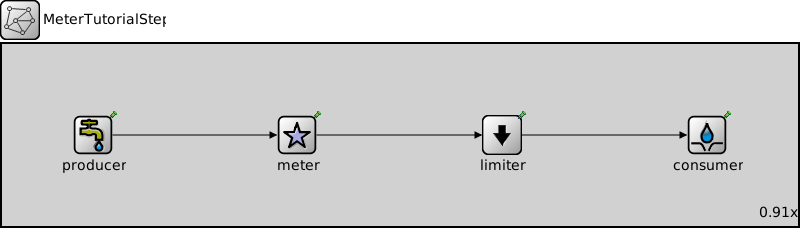
Usage diagram
The following diagram shows usage relationships between types. Unresolved types are missing from the diagram.
Properties
| Name | Value | Description |
|---|---|---|
| isNetwork | ||
| display | bgb=875,200 |
Unassigned submodule parameters
| Name | Type | Default value | Description |
|---|---|---|---|
| producer.displayStringTextFormat | string | "created %p pk (%l)" |
Determines the text that is written on top of the submodule, supports displaying pars, watches, and module-specific information |
| producer.packetNameFormat | string | "%a-%c" |
See directives in module documentation |
| producer.packetRepresentation | string | "byteCount" |
Determines the chunk of the packet data |
| producer.packetProtocol | string | "unknown" | |
| producer.packetLength | int | ||
| producer.packetData | int | -1 | |
| producer.attachCreationTimeTag | bool | true | |
| producer.attachIdentityTag | bool | true | |
| producer.attachDirectionTag | bool | true | |
| producer.clockModule | string | "" |
Relative path of a module that implements IClock(1,2); optional |
| producer.initialProductionOffset | double | -1s |
Initial duration before which packets are not produced. When negative, then produce packet in initialize() |
| producer.productionInterval | double |
Elapsed time between subsequent packets pushed to the connected packet consumer |
|
| producer.scheduleForAbsoluteTime | bool | true |
When a clock is used, "relative" means that setting the clock will not affect the simulation time of the event |
| meter.displayStringTextFormat | string | "metered %p pk (%l)" |
Determines the text that is written on top of the submodule, supports displaying pars, watches, and module-specific information |
| meter.alpha | double |
Parameter in the range of (0, 1) for the exponential weight decrease |
|
| limiter.displayStringTextFormat | string | "dropped %d/%p pk (%k/%l)" |
Determines the text that is written on top of the submodule, supports displaying pars, watches, and module-specific information |
| limiter.backpressure | bool | false | |
| limiter.maxDatarate | double | nan | |
| limiter.maxPacketrate | double | nan | |
| consumer.displayStringTextFormat | string | "received %p pk (%l)" |
Determines the text that is written on top of the submodule, supports displaying pars, watches, and module-specific information |
| consumer.clockModule | string | "" |
Relative path of a module that implements IClock(1,2); optional |
| consumer.initialConsumptionOffset | double | 0s |
Initial duration before which packets are not consumed |
| consumer.consumptionInterval | double | 0s |
Elapsed time between subsequent packets allowed to be pushed by the connected packet producer, 0 means any number of packets can be pushed at the same simulation time |
| consumer.scheduleForAbsoluteTime | bool | true |
When a clock is used, "relative" means that setting the clock will not affect the simulation time of the event |
Source code
network MeterTutorialStep
{
    @display("bgb=875,200");
    submodules:
        producer: ActivePacketSource {
            @display("p=100,100");
        }
        meter: ExponentialRateMeter {
            @display("p=325,100");
        }
        limiter: StatisticalRateLimiter {
            @display("p=550,100");
        }
        consumer: PassivePacketSink {
            @display("p=775,100");
        }
    connections allowunconnected:
        producer.out --> meter.in;
        meter.out --> limiter.in;
        limiter.out --> consumer.in;
}

//-------------------------------------------------
File: tutorials/queueing/QueueingTutorial.ned
 This documentation is released under the Creative Commons license